Reactivating Silent B2B Payers After Automated Reminders Have Run Their Course
Silence on an overdue invoice has four causes, each with its own fix.

AI plus human collections follow-up for B2B accounts receivable works best when automation sends routine reminders and people look into accounts that go silent. Once reminders stop working, the next step is to identify the blocker, which may be portal rejection, stalled approval, an undisclosed dispute, or a cash constraint. Each needs its own fix, and a louder reminder will not solve it.
Why automated reminders eventually stop working — and what that silence is actually telling you
The inbox is quiet, the aging report is growing, and another reminder feels like knocking on an empty house. Automated reminders are built for customers who forgot to pay an invoice already sitting in their system, ready for payment. In that situation, a nudge can work. When repeated nudges get no response, finance teams need to ask whether the invoice can be paid as it stands.
Silence is diagnostic information. The invoice may never have reached the buyer’s system, may be waiting for approval, or may have a dispute behind it. Even an approved invoice can sit unpaid when the buyer has too little cash. Vanguard Collection’s escalation guide recommends a process that gets an answer. The practical shift is from asking for payment again to finding out what prevents it.
The portal rejection problem — when the invoice was never received in the first place
An invoice can be overdue in the supplier’s ledger without being late in the buyer’s system. If it was never submitted through the required portal, or the portal rejected it, the buyer’s payment clock has not started. That distinction explains some otherwise baffling silence. A contact may say by email that they have the invoice but have no control over portal submission, so finance keeps chasing someone who cannot move it forward.
The portal itself can hide the break. Each buyer sets its own credentials, mandatory fields, PO-matching rules, attachment requirements, and approval flows. A rejected Coupa invoice can go unnoticed for weeks if rejection notifications are not properly configured, and the rejection is not automatically actioned in the customer’s AP queue. Each Coupa buyer also needs a separate session with its own field configuration, so invoices for different customers cannot go through in one bulk submission. Tipalti needs both a payment method and a completed tax form before it will release payment, even if the invoice is approved.
The first intervention is therefore a status check. For an enterprise invoice that has gone quiet, confirm whether it was submitted through the required portal, inspect its status there, and establish whether it was rejected and why. Any fix must meet what the buyer requires, without assuming that the rules from another customer’s portal apply.
The approval stall — when the invoice is in their system but going nowhere
The invoice has arrived, but it is sitting in a queue, routed to the wrong approver, or waiting for a document the supplier’s finance team did not know was required. Receipt is not the same as readiness to pay. Here, the intervention is reaching the person who can unblock approval.
The useful signal is a reachable contact offering reassurance without a date. “It’s being processed” and “I’ll check on it” sound encouraging, but neither is a payment commitment. The next message should ask if the invoice is waiting for approval or if something needs fixing. Vanguard’s framework recommends asking for a payment date today or immediate notice of an issue holding it up. A direct question gives the contact room to disclose the obstacle without defending against an accusation.
If that contact still cannot provide a date, change the recipient. AP management or the person who signed the contract may have the authority the original contact lacks. Another reminder to the same person does not create that authority. The answer, or continued silence after a clear question, helps distinguish an internal stall from avoidance and determines where the next conversation belongs.
The undisclosed dispute — when silence is a customer’s way of saying something is wrong
A customer who was engaged before invoicing may be avoiding an uncomfortable conversation. The strongest clues are a clean payment history, silence beginning with this particular invoice, and a contact who responds on other subjects but deflects payment questions. Something about this invoice may be wrong. On a strategic account, treating that pattern as simple delinquency can turn a fixable concern into a relationship problem.
The intervention is to make the concern easy to raise. A low-pressure message can ask the buyer to point out anything on the invoice that needs a closer look before collection follow-up goes on. That invitation removes the need for the customer to start a confrontation. Versapay gives buyers another way to raise concerns through a portal where they can view and pay invoices, apply credits, and raise and track disputes.
Once a dispute appears, pause standard reminders and route it to the right team. Resolution depends on the nature of the concern, so there is no universal collection script for what happens next. Surfacing it is the first useful result. Continuing to demand payment while the issue is under review tells the customer that disclosure changed nothing, which is hardly an incentive to keep talking.
The cash constraint — how to tell when a buyer can’t pay rather than won’t, and what to do differently
A cash-constrained buyer may acknowledge the invoice, promise payment, and then miss the promised date. The money may simply not be available. Repeated broken commitments, requests to split an invoice or temporarily extend terms, and worsening payment across multiple invoices point toward cash pressure.
A structured payment plan with a written schedule and partial payment now gives the buyer a path forward while moving some cash. A credit hold on new orders limits additional exposure. It is risk management, and it creates a decision point while treating the existing balance as recoverable.
The conversation may also need more senior participants. The buyer’s CFO or owner is more likely than AP to authorize a payment plan, so escalation should involve senior contacts on both sides. Meanwhile, declining trade references, late payments across multiple invoices, and public signs of financial distress warrant attention before the next missed commitment. Cash pressure can precede a write-off, and that risk is a reason to structure the response.
The escalation sequence — a concrete order of interventions once the blocker is identified
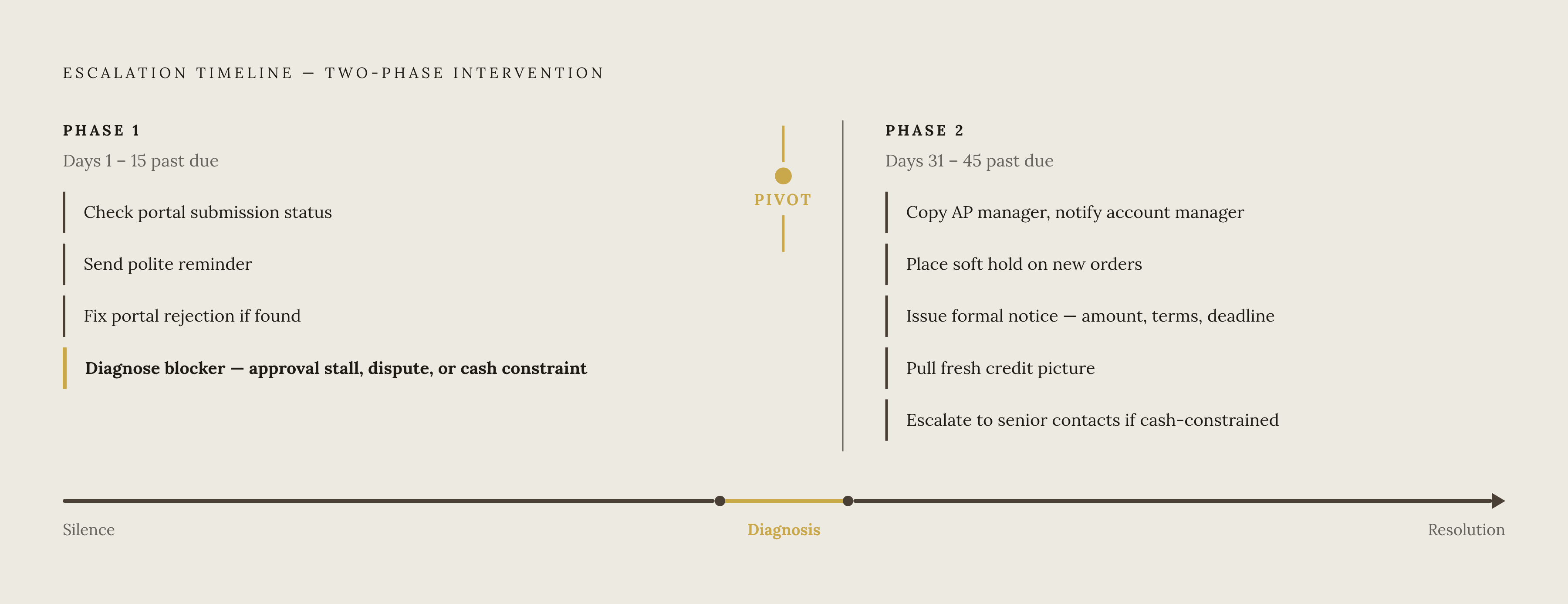
Days 1–15 past due. Check that the invoice arrived and check its portal submission status, then send a polite reminder asking if anything is holding payment up. If the portal shows rejection, fix what caused the submission to be rejected. If the reply shows an approval issue, dispute, or cash constraint, switch from the generic reminder sequence to the fix that fits.
Days 31–45 past due. Escalate the recipient by copying the AP manager and notifying the account manager. Place a soft hold on new orders. A formal written notice should include the amount, original terms, where things stand now, and a clear deadline. The notice should create a specific decision point rather than leave the next response to whenever the buyer gets a chance.
That distinction sets the next action. An operational problem may still be fixable, while a financial one calls for a payment plan or escalation to senior contacts. A fresh credit picture is warranted at this stage.
Contact escalation runs through these stages. When the original contact goes dark, check out-of-office replies and email signatures for redirect information. Next, use external data enrichment to find the current AP contacts. If that does not resolve the gap, call the main line to locate accounts payable rather than waiting for the original contact to reappear.
Every stage also needs a deadline the buyer can act on. Requesting confirmation by a stated day and time, with notice of the next recovery stage if no response arrives, creates a decision point. “Just checking in when you get a chance” does not.
Can AR software handle this — and where is human-guided intervention irreplaceable?
Reminder software automates scheduled outreach before and after a due date. Full AR collections automation has a broader job, including risk-based prioritization, promise-to-pay tracking, dispute routing, portal navigation, escalation logic, and exception handling. Dunning is one part of a system that must also decide when to escalate, pause, or close an account’s collection workflow.
A reminder system cannot diagnose evidence it does not see. A portal status nobody checked, a concern the buyer never raised, and an unanswered message do not explain themselves in an aging report. Getting paid through Coupa or SAP Ariba may require a person or an agent that can enter the customer-specific portal, navigate its requirements, attach documents, and confirm submission.
Even broader automation leaves judgment to people at three points. Someone must make sense of unclear signs, such as vague replies, missed promises, and approval cycles that take much longer than usual. Someone must also calibrate tone for the relationship, because a long-tenured customer with a temporary stall warrants a different response from a new account with a deteriorating pattern. Finally, payment-plan negotiations and escalation to a buyer’s CFO require human presence and authority.
Choosing the right AR infrastructure for accounts that go silent — what to look for and how leading options compare
Portal submission and status monitoring should show how far an invoice has moved through approval as well as its aging in the supplier’s ledger. Promise-to-pay tracking should distinguish a missed commitment from an invoice that never received one. Risk-based routing should account for recovery risk and account tier, while dispute handling should pause reminders and send the issue to the right team. When the automated sequence runs out, people should be able to follow up by phone and work through portals as well as send email.
HighRadius serves enterprise-scale AR, using AI models trained on payment behavior data to predict late payment and prioritize collections by predicted recovery value. That makes it relevant to large receivables portfolios where risk scoring can improve prioritization.
Upflow connects with Salesforce and HubSpot so AR teams can use CRM context when sequencing outreach. Its integrations bring in contacts, account owners, and custom fields and send collections data back to the CRM for wider visibility. That context supports relationship-sensitive follow-up. It is useful when a strategically important account needs a different escalation tone, though the conversation still requires someone to exercise judgment.
Tesorio includes a Supplier Portal Automation agent that logs into Coupa and SAP Ariba to submit invoices, check payment status, and download remittance data. This addresses the portal blocker directly. Its dispute workflow can route issues to the team with relevant documentation and suggested actions, while its product FAQ states that agents require approval before accepting a deduction or dispute resolution.
The upgrade signal is meaningful manual follow-up after reminders finish, recurring time spent managing portals, or rising DSO despite stable churn. A team facing those conditions should evaluate the workflow beyond outreach, including the people available to handle exceptions. A system’s value to a buyer depends on whether it helps establish what prevents payment and puts the next action in the right hands.