End-to-End AR Management Inside Ariba and Coupa Is a Service Category Now
Portal rejections quietly restart payment clocks, and only full-cycle AR coverage catches them.

End-to-end AR management inside Ariba and Coupa is a distinct service category because getting an invoice accepted now requires work that ordinary collections software does not cover. An AI-powered AR team claiming this coverage must submit invoices, monitor acceptance, fix rejections, resubmit, and follow up for payment.
How buyer-mandated portals changed the invoice submission problem
Large enterprise buyers have moved from accepting emailed invoices to requiring submission through their own accounts payable portals. As that requirement moves further down the supply chain, suppliers find that part of their revenue depends on meeting each buyer’s submission rules. Sending the invoice is no longer enough. The supplier must get it into the buyer’s system in a form that the system will accept, with the right purchase order match and required fields.
That changes the nature of invoice delivery. An emailed invoice and a portal submission may represent the same sale, but they are not the same operational task. With a portal, the invoice must pass a separate acceptance step after it is issued and before the buyer has an approved payable to process. The buyer controls that gate. The supplier can have a perfectly respectable invoice in its ledger and still have unfinished work on the other side.
Coupa Supplier Portal and SAP Business Network (Ariba) support integration paths for high-volume suppliers, while buyer-built portals offer almost none. A supplier may therefore automate submissions for several customers yet still key invoices into another customer’s bespoke system. One large account can consume more AR hours than the rest of the ledger combined. Revenue concentration has acquired an administrative sidekick.
The failure mode that standard AR processes cannot see
A rejected portal submission creates a split between the supplier’s records and the buyer’s records. The supplier has issued an invoice, so it sits in the ledger and ages. The customer, however, has no approved payable to process. Both records can be correct for the workflows they track. What is missing is visibility into the gap between them.
The rejection may appear only as a status change inside the portal. If the AR team checks that portal once a week, if at all, the invoice can sit there without anyone correcting it. The aging report shows an outstanding balance, but it does not expose the failed submission as such. That distinction is the trap. A normal collections cadence cannot respond to a portal event it never receives, even if the supplier’s system continues treating the invoice as overdue.
Correction brings a second cost because most enterprise AP policies start net terms from the date of a valid, accepted invoice. Fixing and resubmitting the invoice usually restarts that clock. The supplier can lose a full payment cycle, while the buyer’s records show no late payment to escalate. From the buyer’s perspective, the clock has only just started. A company can therefore run a tidy dunning process and still watch days sales outstanding rise, with the underlying problem discovered only when an account reaches the 60-day mark and someone investigates.
Why portal complexity scales faster than headcount
Every new enterprise buyer can add another set of credentials, required fields, approval workflows, and submission rules. Invoice volume is only one dimension of the workload. The other is variety, because the team must know which rules apply before it can complete the work. More customers can mean more exceptions to remember.
AR teams often absorb this responsibility quietly, usually through one person with a spreadsheet of portal logins. That arrangement hides the workload until a submission fails and an account ages far enough to attract attention. The spreadsheet has become an unofficial operating system. It may record access details, but it does not remove the need to enter invoices, check status, resolve missing information, and return to the portal.
For lean finance teams and startups, self-service software can change the interface without changing who does the work. Someone still configures the rules, manages submission queues, and handles escalations. A nicer queue is still a queue. Where portal accounts represent a small share of receivables, this can remain a process adjustment. Where they represent a large share, the lesson for buyers is to evaluate portal handling as a core AR function, together with cash application and collections.
What end-to-end portal AR management actually covers
End-to-end portal AR management starts by submitting an invoice with the right PO match and field formatting. It continues through monitoring submission status, identifying rejections, correcting the underlying problem, and resubmitting when necessary. Once the invoice is validly accepted, the work moves into collections follow-up. Acceptance is the hinge between those two phases. Coverage that ends at upload stops before the supplier knows whether the buyer has an invoice it can process.
Those phases need different tools and human workflows. If invoices are accepted cleanly but paid late, more submission automation does not address the delay. The team needs to keep following up after acceptance. Conversely, if invoices keep failing validation and payment clocks keep restarting, another dunning sequence cannot repair the submission. Buying automation for the wrong phase leaves the actual bottleneck untouched.
The category also includes the less glamorous work that prevents acceptance in the first place. Missing documents, PO mismatches, missing W-9s, and failures to communicate between supplier and buyer AP teams can hold up an invoice just as much as a wrong invoice field. Resolving these issues is part of getting the invoice accepted. General AR automation and general outsourcing may cover portions of this chain, but an end-to-end claim requires responsibility across the handoffs, including the awkward ones that do not fit neatly into a software feature.
How submission automation and post-acceptance follow-up work together
Submission monitoring and collections follow-up must share a reliable view of acceptance. Otherwise, the collections workflow can chase an invoice that the buyer has never approved. The date alone is not enough. A follow-up schedule needs to distinguish an invoice waiting for payment from one still waiting to qualify for payment, because the next action is different.
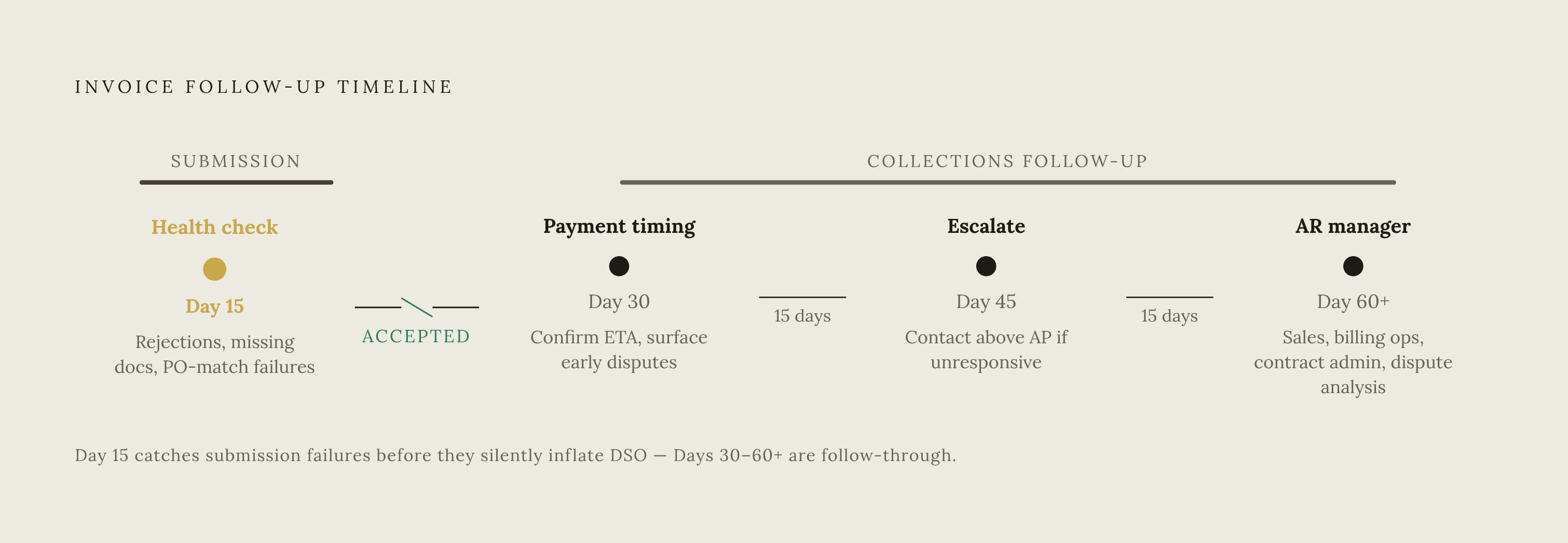
The four-trigger cadence illustrates how those responsibilities connect. The Day 15 step is especially useful as a check on submission health, catching submission rejections, missing supporting documents, and PO-matching failures before they slip unnoticed into later aging buckets. The submission layer must establish valid acceptance before the collections clock starts, rather than letting the invoice issue date stand in for it.
With that acceptance established, Day 30 follow-up confirms payment timing and surfaces early disputes. Day 45 escalation reaches a contact outside AP who can act if AP is unresponsive. At Day 60+, the AR manager joins, with sales or customer success involved where the blocker is commercial. A missing PO goes to billing or sales operations, a terms mismatch to contract administration, and a pricing dispute to sales and dispute analysis. Splitting submission and collections without preserving this context recreates the original visibility gap, while treating every blocker as credit risk wastes time and strains the customer relationship.
What the Coupa and Ariba portals each require from a supplier operations standpoint
Coupa offers several submission routes, including PO flip, manual portal entry, cXML, and email/PDF routes where the buyer allows them. Supplier Actionable Notifications let a supplier turn an incoming purchase order email into an invoice without logging into the portal, although authentication requires a one-time password. This is the fastest route for low to medium volume. For high volume, cXML submission from the billing system removes manual entry but requires integration work upfront. The appropriate workflow therefore depends on both volume and the buyer’s permitted routes.
Coupa also uses AI-powered invoice validation and three-way matching to flag duplicate or fraudulent invoices. A submission that fails matching may be automatically disputed or placed on hold. Exceptions need a path forward. Configurable tolerance levels can route them to human reviewers for approval, which makes understanding matching and exception handling part of supplier operations as well as technical integration.
Ariba offers portal entry and PO flip at both standard and enterprise account levels, while full ERP integration is available only at enterprise level. Its automation features, including cXML and EDI support, sit at enterprise account tiers, Silver and above. All supplier accounts start free, but crossing transaction thresholds with one buyer makes the supplier chargeable across all buyer relationships on the network. That cost belongs in pricing conversations with buyers. Buyer-built portals pose a different constraint, offering manual entry with almost no integration path, so each invoice requires a separate login-and-enter workflow.
Where standard AR software stops and the service category begins
Standard AR automation works well for reminder sequences, cash application, and keeping track of aging. Most tools, however, stop short of logging into third-party portals and do not monitor portal submission status. Rejections therefore sit outside their visibility by design. That is a scope boundary that leaves the usefulness of their other features intact.
For a buyer comparing claims, “monitors portals” and “operates inside portals” describe different capabilities. Monitoring can show that something needs attention without fixing it. Submission execution means entering the required data, meeting PO and field requirements, and moving the invoice through the portal workflow. Rejection handling extends that responsibility further. A tool that raises an alert may be useful, but the supplier still owns the work unless someone is responsible for resolving it.
Software can keep AR in-house while automating parts of the workflow, and outsourcing can transfer execution to a third party. Portal AR management adds a more specific requirement, which is hands-on operation inside the buyer’s systems. Neither a general software description nor a general outsourcing contract establishes that capability. The buyer’s question is whether the offering fills this operational gap, rather than whether it replaces every existing AR tool. An AI label does not tell the buyer who will handle a rejected invoice on Tuesday afternoon.
How do you get someone to handle Coupa and Ariba submissions end-to-end?
A provider that claims end-to-end coverage needs to show that it handles five layers of work. Portal breadth means active submission coverage across the systems customers actually use, including Coupa, Ariba, Tipalti, and buyer-built portals. Familiarity with two logos is not enough. Submission execution means logging into portals when needed and submitting invoices with the right PO matching and field mapping, which takes more than monitoring activity or sending alerts.
Rejection triage is the next layer, with a defined process for catching validation failures, correcting them, and resubmitting before delays accumulate. Post-acceptance follow-up then needs to start from confirmed valid acceptance. Vendor onboarding paperwork completes the scope. The service needs to cover W-9s, supplier registration, and missing supporting documents when they keep invoices from being accepted.
Relationship safeguards deserve equal scrutiny because fully automated or outsourced escalation can damage sensitive accounts. The right provider uses controlled templates, human escalation paths, and policy-based authorization for credit holds and payment plans. Judgment remains part of the job. Implementation speed is another practical signal, since months of configuration before the first portal submission can add integration complexity and leave the operational burden in place.