Subject Lines That Get Overdue Invoice Emails Opened
Strategic subject lines boost open rates for overdue invoice emails.
Late payment is the default setting in B2B commerce. Every accounts payable inbox is already stacked with reminder emails from a dozen other vendors, all asking for the same thing at the same time. The subject line has become the actual battlefield where getting paid is won or lost. The body copy barely matters if the subject line never earns the click.
Most invoice reminders fail because the tone is wrong for the moment: too casual when the invoice is already 45 days gone, too aggressive on day one when nobody's done anything wrong yet, or so generic it blends into the wallpaper of every other "just checking in" email sitting above it. An invoice reminder isn't a marketing email or a renewal nudge. The service has already been delivered, the payment is a legal obligation, and the subject line has to carry that weight without tripping a spam filter or torching a relationship that took years to build. That balance shifts at every single stage of the collection sequence, which is the whole reason a single template can't do the job.
What drives an invoice email open: the four mechanisms
Four things determine whether an invoice subject line gets opened: specificity, personalization, a number, and urgency that's actually earned. Learn each one on its own and the stage-by-stage playbook later in this piece will make a lot more sense, because every recommendation in it traces back to one of these four levers.
Specificity beats cleverness every time. The job of an invoice subject line isn't to win a copywriting award, it's to let the reader know in half a second what they're looking at. A formula like invoice number plus status plus one clear action does that work reliably: "Invoice #2481 overdue, please confirm payment date" tells the recipient everything they need to decide whether to open it now or later. Vague subject lines like "following up" or "quick note" still have a place early in the sequence, when a soft touch is appropriate, but they lose their power fast as the invoice ages. They simply don't carry enough weight to interrupt someone running through forty other emails in their AP queue.
Personalization works as a filter, not a flourish. Dropping a company name into the subject line signals to a busy executive that the email was written for them specifically, not blasted to a list. This matters most with larger organizations, where the AP contact is triaging dozens of supplier emails a day and mentally sorting them by sender. A company name in the subject line slots the email straight into that mental filing system instead of making the reader stop and figure out who it's from.
A number does double duty. Invoice numbers and day-counts give the eye something to land on, and they promise the reader concrete information. "Invoice #1234, 12 days overdue" tells a story in five words. Compare that to "payment reminder," which could mean anything from a friendly nudge to a legal threat, and the reader has no way to know which until they open it.
Urgency only works when it's true and checkable. "Invoice #1234 due today" is something the recipient can verify against their own records in about four seconds, which is what makes it credible. "URGENT: Act Now" slapped on an invoice that's three days overdue reads as noise rather than fact, since no one can verify it. The damage compounds over time, too: a client who sees "FINAL NOTICE" on day five, long before anything is actually final, learns to stop taking final notices seriously. A real final notice that shows up weeks later lands with all the authority of a boy who's cried wolf at the AP department.
Spam filters and invoice subject lines in 2026
A perfectly calibrated subject line that never reaches the inbox is worse than a boring one that lands, because at least the boring one gets read. Before any stage-by-stage tone strategy matters, the email has to clear the spam filter, and the patterns that trip those filters are often the exact words that feel natural when an invoice is genuinely overdue.
Modern spam filtering at Gmail, Outlook, and Yahoo uses AI scoring that weighs the subject line two to three times heavier than the body copy, making it the single highest-stakes line of text in the whole email. These filters read for meaning now, not just strings of characters. Typing "URGENT" with a zero instead of an O, or swapping in symbols to dodge detection, stopped working around 2020. The filter understands intent the same way a human does, so there's no clever spelling trick left to hide behind.
Some patterns are flagged almost automatically. Writing "Re: your invoice" or "Fwd: your order" when there was never a prior email thread is a classic phishing signature, and filters treat it with real suspicion because so many actual scams use exactly that trick to look familiar. Words like "act now," "final notice," "last chance," and "immediate action required" are on the same list of high-risk urgency phrases that deliverability systems are trained to catch. Using these words before they're true gets an email marked as spam.
The safe path is straightforward: keep subject lines short, skip ALL CAPS entirely, include the invoice number since it signals a transactional email rather than a promotional one, and save "URGENT" or "ASAP" for the rare moment something has actually reached that stage. Sender reputation adds another layer on top of all this. A beautifully worded subject line sent from a domain with a poor sending history will still underperform. Invoice reminders belong on dedicated transactional email infrastructure. Basic authentication setup through standard email verification protocols is table stakes here, not a differentiator.
The exact language that signals urgency to a human reader is often the same language that signals spam to a filter. "Final notice" moves a person. It also moves an algorithm, in the wrong direction. That overlap is precisely why stage calibration isn't a nice-to-have. Reserve the consequence language for the point in the sequence where it's both true and necessary, and deliverability and the relationship both improve at the same time.
Matching subject line tone to each stage of the collection sequence
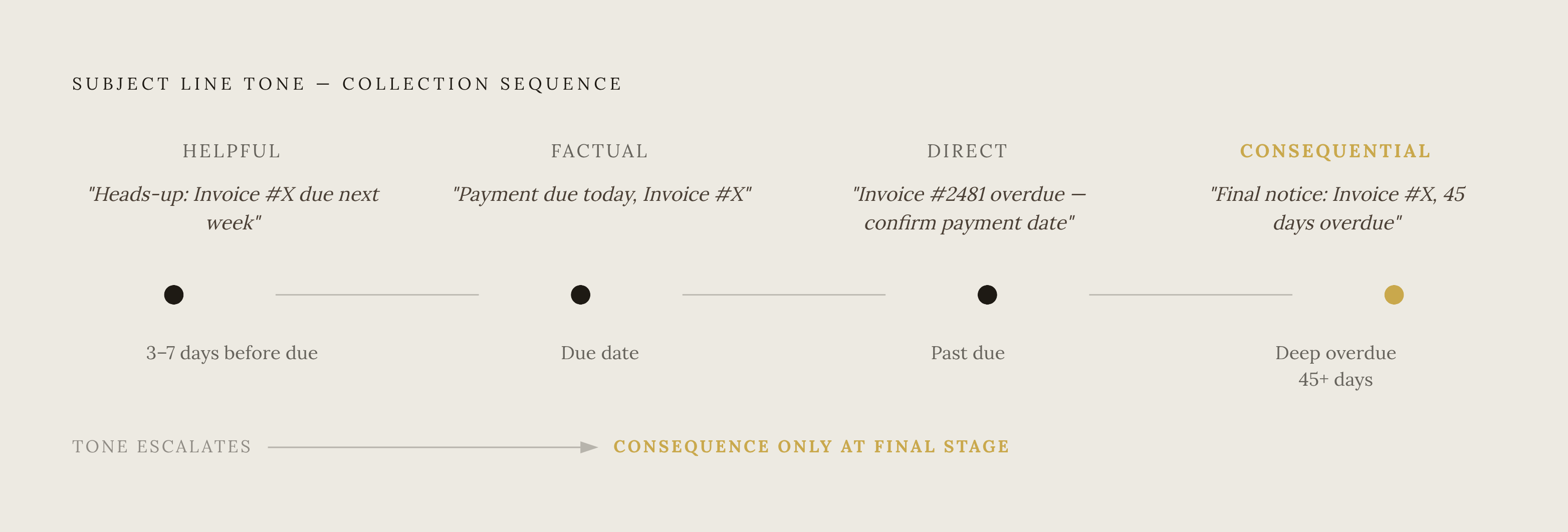
Open rates drop as invoices age. The fifth email from the same vendor about the same invoice has to work harder to get opened than the first one did because fatigue sets in on the recipient's side. The fix is to match the subject line to exactly where the invoice sits in the sequence, moving in deliberate steps from a helpful nudge to a plain statement of fact.
Before the due date, roughly three to seven days out, the invoice isn't late yet, so the subject line should read like a service. "Upcoming payment reminder, Invoice #[NUMBER]" does the job cleanly. "Heads-up: invoice [Invoice number] due next week" or "Invoice [Invoice number], due soon" work just as well. The language here stays neutral and helpful: words like "upcoming," "heads-up," and "due on [date]" are doing the work. Anything resembling "overdue" or "action required" at this stage is a mistake, because the invoice isn't overdue, and framing it that way trains the client to tune out urgency language before it's ever actually urgent. A direct payment link belongs in the body at this stage, since every extra click between reading the email and completing payment is a chance for the reader to get distracted and forget.
On the due date itself, the subject line can simply state the fact. "Payment due today, Invoice #[NUMBER]" or "Invoice [Invoice number] is due today" often does enough on its own to prompt same-day payment, since it's giving the reader useful information. The tone stays friendly, but it's introduced a fact that wasn't true yesterday: the invoice is due now, not soon. A good version of this email also leaves room for the payment already being in transit, acknowledging that the check might be in the mail (sometimes literally). Late fees and consequence language still have no place here. The due date is a fact, not a threat.
As the invoice moves past due, the formula from the first section comes back into play: invoice number, status, and one clear action, stated directly. "Invoice #2481 overdue, please confirm payment date" is the model to build from, swapping in the day count as it grows. This is also the point where a number carries real weight, since "14 days overdue" tells the reader something concrete that "overdue" alone doesn't. The due-date stage asks the reader to confirm something specific, a payment date, where this stage only stated a fact and waited.
Deep into the overdue window, consequence language finally earns its place, provided it's true. This is the only point in the sequence where words like "final notice" belong, and only if what follows really is final. Everything covered in the deliverability section still applies here: no ALL CAPS, no fabricated urgency, no "URGENT" unless the account is genuinely at that stage. The subject line at this point should read like a statement of fact delivered by someone who has already sent the friendly versions and is now documenting what happens next, not someone shouting into an inbox hoping volume will substitute for truth.
The throughline across every stage is the same: a subject line should tell the reader exactly where they stand with the invoice, using only language that is true at that exact moment. Save the big words for when they're earned, so the inbox moves from a shouting match to a conversation that actually gets invoices paid.